Turn every drive into a cinema with high-quality car TV screens. This guide highlights five top options that fit different needs—from 3-in-1 wireless hubs to large headrest displays. Each choice ensures easy setup, robust compatibility, and clear visuals for backseat passengers. Read on to compare screens, resolution, connectivity, and control features to find the best match for your vehicle.
Product Summary
| Product | Brand | Key Benefit | Screen Size | |
|---|---|---|---|---|
| Joywind 3-in-1 Wireless Car TV Adapter | Joywind | Wireless CarPlay/Android Auto with HDMI input | Compact | CarPlay/Android Auto, HDMI |
| WONNIE 13.3″ Car TV Headrest | WONNIE | High-res backseat entertainment with control via remote/app | 13.3″ | WiFi/HDMI/USB |
| WONNIE 13.3″ Car TV for Back Seat | WONNIE | Android 13 media hub with OTA updates | 13.3″ | WiFi/HDMI/USB/Video |
| AINAVI 15.6″ Android Headrest Monitor | AINAVI | Large screen with Android 13 and app access | 15.6″ | WiFi/HDMI/USB/SD |
| GETPAIRR 4-in-1 Car TV Mate Max | GETPAIRR | Convert wired car screens to wireless CarPlay/Android Auto and HDMI | Compact | CarPlay/Android Auto/HDMI |
Joywind 3-in-1 Wireless Car TV Hub

The Joywind 3-in-1 device combines Wireless CarPlay, Wireless Android Auto, and an HDMI TV input in one compact unit. It plugs into your car’s USB port for a true plug-and-play setup, eliminating extra wires. Once connected, your phone re-connects automatically as you enter the vehicle, giving instant access to maps, music, calls, and voice assistants while streaming on an HDMI screen.
This hub lets you attach HDMI devices like a Fire TV Stick or other streaming sticks, letting passengers enjoy Netflix, YouTube, and more in up to 2K clarity. It’s designed to reduce clutter and accommodate a broader range of head units, keeping the front and middle rows connected to the same entertainment ecosystem.
WONNIE 13.3″ Car TV Headrest Monitor

This 13.3-inch headrest display from WONNIE turns the back seat into a private cinema. The vibrant 1920×1200 touchscreen offers smooth interactions, while Android 13 and OTA updates keep apps current. Wi‑Fi or mobile hotspot connectivity enables streaming from popular services, and Miracast/AirPlay compatibility supports seamless wireless mirroring from smartphones. A remote control option via the MyCar Link app enhances rear-seat control for passengers.
WONNIE 13.3″ Car TV Back Seat Monitor

This 13.3-inch monitor mirrors the companion model’s strengths with a strong 1920×1200 IPS touchscreen and Android 13. It supports OTA updates to maintain long-term performance and compatibility with streaming apps. Wireless screen mirroring makes it easy to cast from Android or iOS devices, while the included HDMI/USB options broaden content sources for family road trips and daily commutes alike.
AINAVI 15.6″ Android Headrest Monitor

With a 15.6-inch IPS display and Android 13, this AINAVI headrest monitor creates a large, immersive viewing area for backseat passengers. The device supports 4K video playback and offers access to Google Play for apps, music, and games. Built-in WiFi and hotspot compatibility enable streaming from major services, while HDMI/USB/SD inputs provide flexible media sourcing. OTA updates help keep the system current over time.
GETPAIRR 4-in-1 Car TV Mate Max
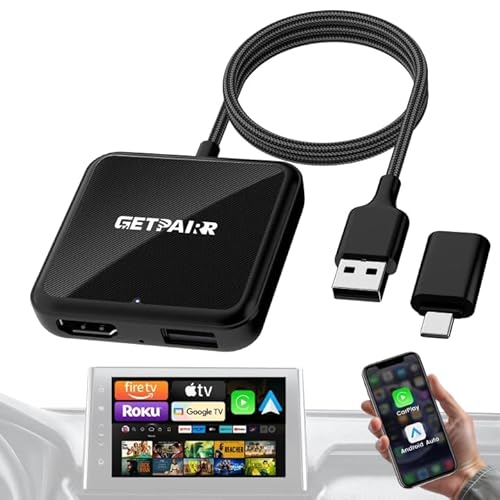
GETPAIRR’s 4-in-1 Car TV Mate Max packs Wireless CarPlay, Android Auto, HDMI, and screen-mirroring into a single dongle. It enables automatic re-connections and a true plug-and-play experience, turning a car’s screen into a versatile entertainment hub. HDMI output lets you stream from devices like Fire TV or Google TV, while screen mirroring gives real-time content sharing from compatible phones. A convenient option for upgrading older infotainment systems.
AINAVI 10.8″ Android Headrest Monitor

This 10.8-inch screen from AINAVI offers a compact, portable option with Android 13 and robust media support. It features 5G/2.4 GHz WiFi or mobile hotspot compatibility for streaming services, plus Mirroring for Android and iOS devices. The device supports 4K video playback, SD/USB media, and app installation from Google Play, which broadens entertainment options for families on the go.
Buying Guide: Key Purchase Considerations
- Screen size and seating arrangement: Larger screens enhance viewing for multiple passengers, while compact units fit smaller cars or front-row visibility for drivers.
- Connectivity: Look for a mix of HDMI inputs for streaming devices, USB/SD for local media, and wireless options (WiFi, hotspot, Miracast/AirPlay) for flexibility.
- Operating system and app support: Android-based headrests with OTA updates and Google Play access provide ongoing access to apps and services; ensure compatibility with your preferred streaming platforms.
- Ease of setup: Plug-and-play devices reduce installation effort. Consider systems that auto-reconnect when the car is restarted and minimize wiring.
- Headrest vs. dash integration: Headrest mounts favor back-seat viewing, while dash-mounted devices may suit front-row passengers or include fold-out designs for versatile use.
- Content policies: Some devices require hotspot access to run online apps. Ensure you have a reliable data source if you plan to stream frequently on the road.
- OTA updates and security: OTA updates help keep apps and firmware current, and Play Protect certification can improve safety and reliability.
- Price-to-feature balance: Compare 3-in-1 hubs, Android headrests, and HDMI-enabled adapters to find the best value for your vehicle’s infotainment setup.
- Durability and accuracy: Look for devices with sturdy builds, responsive touchscreens, and reliable wireless connections for uninterrupted entertainment during trips.
Choosing a car TV screen involves evaluating how passengers will use it, where it will be mounted, and which content sources you prefer. The options above provide a spectrum—from compact CarPlay adapters to large Android-based headrest systems—so you can tailor your in-car entertainment to driving needs and family routines.