Upgrade your driving experience with car-friendly TV solutions that transform road trips into entertainment sessions. This guide highlights five top USB/HDMI-enabled car TVs and CarPlay/Android Auto adapters that let you stream, mirror, and play on the go. Each option supports different vehicle setups, from factory CarPlay upgrades to HDMI-enabled headrests, helping you pick the right fit for your car and your passengers.
| Product | Brand | Key Benefit |
|---|---|---|
| Joywind 3-in-1 Car TV Hub | Joywind | Wireless CarPlay/Android Auto with HDMI TV input |
| ByteWave 2-in-1 Car TV Mate Pro | ByteWave | Wireless CarPlay + HDMI streaming in one dongle |
| WONNIE 13.3″ Car TV Headrest | WONNIE | High-resolution Android headrest monitor with Mirroring |
| GETPAIRR 4-in-1 Car TV Mate Max | GETPAIRR | CarPlay + Android Auto + HDMI; screen mirroring |
| LAMTTO HDMI Input Car TV Kit | LAMTTO | HDMI input dongle for wired-to-wireless CarPlay/HDMI |
Note: The following selections focus on devices that expand in-car entertainment while preserving native car systems. They range from wireless CarPlay adapters to full headrest displays and HDMI-enabled streaming capabilities.
Joywind 3-in-1 HDMI Car TV & Wireless CarPlay Adapter

The Joywind device combines Wireless CarPlay, Wireless Android Auto, and a dedicated HDMI TV input in a single, plug-and-play module. It upgrades a factory car stereo to enable wireless navigation, music, calls, and video streaming when an HDMI source is connected. Real-time mirroring from compatible smartphones is supported, turning your car screen into a versatile entertainment hub. The setup emphasizes automatic reconnection and straightforward usage, helping drivers keep focus on the road while passengers enjoy streaming content on the go.
2-in-1 Wireless CarPlay Adapter & Car TV Mate Pro 2025

This compact dongle delivers Wireless CarPlay and HDMI streaming in one unit, designed to reduce clutter in the cabin. It enables access to iPhone apps like Maps and Music directly on the car display and supports control via the vehicle’s original buttons. The HDMI port opens possibilities for streaming devices such as Fire TV Stick or other HDMI-enabled devices, enabling passengers to watch content on the road. A hotspot or in-car Wi-Fi is required for online apps, and the setup emphasizes plug-and-play simplicity with no extra apps needed.
WONNIE 13.3″ Car TV Headrest Monitor

The 13.3-inch WONNIE headrest monitor delivers a capacitive 1920×1200 touchscreen with 4K playback support, offering a high-quality viewing experience for backseat passengers. It runs Android 13 with OTA updates, enabling streaming apps via WiFi or a mobile hotspot. Wireless Mirroring supports Miracast and AirPlay, allowing phone content to be displayed on the monitor. The MyCar Link app can serve as a remote, enhancing ease of control for rear-row entertainment on long trips.
GETPAIRR 4-in-1 Car TV Mate Max
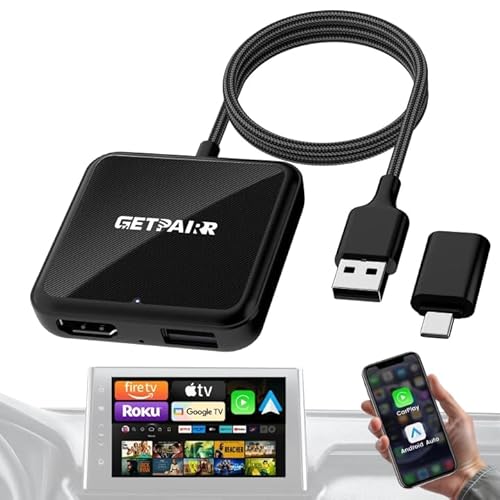
The Gen4 4-in-1 Car TV Mate Pro Max combines Wireless CarPlay, Android Auto, and HDMI in one compact dongle. It emphasizes faster auto-reconnect and true plug-and-play operation, enabling maps, music, calls, and voice control on the car display. The HDMI output converts the car screen into a larger viewing area for streaming devices like Fire TV Stick or Google TV. It supports screen mirroring for compatible devices, but it notes that car screens may not control HDMI devices directly, and a hotspot is required for online apps.
LAMTTO HDMI Input Car TV & Wireless CarPlay Adapter

The LAMTTO adapter is a 2-in-1 solution that converts wired CarPlay to wireless and supports HDMI output to stream from devices like Fire TV Stick or Nintendo Switch. It targets factory CarPlay-equipped vehicles and emphasizes automatic wireless connectivity when the car starts. It supports one device at a time and aims to preserve native car system functionality while enabling wireless CarPlay and HDMI-based streaming for in-car entertainment.
Buying Guide
Key considerations when choosing a car TV or CarPlay/Android Auto adapter
- Vehicle compatibility: Confirm whether your car supports OEM wired CarPlay/Android Auto and if the device requires a touchscreen. Some adapters exclude BMW, Tesla, or certain OEM configurations.
- Connectivity needs: Decide between wireless CarPlay/Android Auto and HDMI-based streaming. Wireless provides seamless start-up, while HDMI expands content options via Fire TV Sticks, game consoles, and streaming devices.
- Power and installation: Look for plug-and-play devices that use existing USB ports or require minimal wiring. Consider whether your vehicle has a stable hotspot or in-car Wi-Fi for online apps.
- Resolution and display: For headrest monitors, prioritize screen size, resolution (HD, FHD, 4K), and touch responsiveness. If using a headrest, ensure it’s compatible with passengers’ viewing distances.
- App availability and updates: Android-based headrest displays with OTA updates offer longer-term app access. Check for Google Play access or APK sources and update frequency.
- Audio considerations: Some HDMI-based adapters do not provide built-in audio; ensure your vehicle’s speakers can receive audio through CarPlay/Android Auto or use Bluetooth/audio outputs as needed.
- Security and reliability: Favor devices with stable Bluetooth/Wi-Fi reconnection, and avoid setups that introduce driver distraction or excessive cable clutter.
- Pricing and support: Compare warranties, customer support quality, and included accessories. Balanced investments often yield better long-term reliability for in-car entertainment.
The selections above cover wireless CarPlay/Android Auto upgrades, HDMI streaming to car screens, and backseat headrest entertainment. They offer a range of installation complexities and feature sets to suit different vehicles and passenger experiences. When evaluating options, map your car’s existing infotainment capabilities against how you want passengers to access streaming apps, navigation, and media on the road.